

A blank thermostat screen is almost always a power problem, not a failed thermostat. The display lights only while it sees roughly 24 volts between its R and C terminals, so anything that opens that circuit takes the screen dark with it: dead batteries, an open blower door switch, a tripped breaker, a full condensate pan, or a blown fuse the size of a car fuse sitting on the furnace control board. Trane states it plainly in its own thermostat troubleshooting guide: "A blank thermostat display indicates no power to the thermostat." This guide walks that power path in the order a technician walks it, then gives the reset procedure for the brands homeowners actually search for: Trane, Honeywell Home, Carrier, American Standard and White-Rodgers.
Most pages on this topic stop at batteries, breaker, call your dealer. Two of the steps below are the ones that find the fault on a real service call and appear on none of the manufacturer troubleshooting pages: the low-voltage fuse on the control board, and a measured voltage reading between R and C. If you are working a broader problem, start with our AC not turning on guide or the Sacramento furnace troubleshooting guide, then come back here once you know the thermostat itself is dark.
Table of Contents
- 60-Second Triage: What a Blank Screen Is Telling You
- How a Thermostat Actually Gets Its Power
- Restore Power to a Blank Thermostat: 7 Steps in Order
- The Fuse Almost Everyone Checks in the Wrong Place
- Blank Screen but the Fan Still Runs
- Trane and American Standard Thermostats
- Honeywell Home Thermostats
- Carrier and Bryant Thermostats
- White-Rodgers, Emerson and Older Digital Thermostats
- When the Thermostat Itself Is Dead
- Replacing a Thermostat in Sacramento: Rebate and Disposal
- When to Call an HVAC Technician
- Frequently Asked Questions
60-Second Triage: What a Blank Screen Is Telling You
Start here. The pattern around the blank screen narrows the cause faster than working through a list of ten possibilities in order.
| What you are seeing | What it usually means | First move |
|---|---|---|
| Screen fully dark, no response to any button | No power at the thermostat: dead batteries or an open 24-volt circuit | Batteries, then the blower door and service switch |
| Screen dark, but the indoor fan is running | Line voltage is fine, the 24-volt control circuit is not | Control board fuse, then the G and R wiring |
| Went dark during or right after a power outage | Tripped breaker or a fuse that blew on the surge | Breaker first, then the board fuse |
| Went dark in cooling weather, water near the indoor unit | Condensate float switch has opened the 24-volt circuit on purpose | Clear the drain, then service the drain line |
| Went dark right after a new thermostat or new equipment | C wire not landed, or the Rc/R jumper in the wrong position | Recheck both ends of the wiring against the install guide |
| Screen dark and you smell hot plastic or see scorched wire | Shorted thermostat wire or a failed transformer | Stop. Kill the breaker and call a technician |
How a Thermostat Actually Gets Its Power
Your thermostat is not wired to household 120-volt power. A transformer inside the furnace or air handler steps 120 volts down to 24 volts, and that low voltage travels to the thermostat on the R wire and returns on the C wire, the common. Battery models use the batteries to run the display and borrow the 24 volts only to switch the equipment. Hardwired and smart models run the display on the C wire full time, which is why a loose common takes the screen out completely.
That means the blank screen has a physical path you can walk, and every device on it is a suspect:
- The breaker feeding the furnace or air handler.
- The service switch, a light switch usually mounted on or beside the indoor unit.
- The blower door safety switch, a plunger the access panel presses when the door is properly closed.
- The transformer that makes the 24 volts.
- The low-voltage fuse on the control board, protecting that 24-volt circuit.
- The condensate float switch, wired to open the 24-volt circuit when the drain pan fills.
- The thermostat wire itself, from the equipment to the wall.
Nine times out of ten on our service calls, the fault is one of the first six, not the thermostat hanging on your wall. Honeywell Home's own instructions start in the same place: "Verify the furnace / air handler door is closed, the power switch is on, and the breakers are on."
Restore Power to a Blank Thermostat: 7 Steps in Order
Work them in this order. Each step rules out a whole branch of the power path, so skipping ahead usually means backtracking.
1. Rule out the batteries, and know whether yours has any
If your thermostat takes AA or AAA cells, put fresh ones in before doing anything else. Alkaline cells in a thermostat typically last a year or two, not the five years the marketing suggests, and a set that reads fine in a tester can still be too weak to drive a backlit display.
The trap here is that many modern thermostats have no user batteries at all. On Trane's XL824, XL850 and ComfortLink II controls, and the matching American Standard Gold 824 and Platinum 850 and 1050, we find no battery compartment in the field: they run on 24 volts from the equipment. Trane's own published reset for these models is a breaker or on-screen reboot, never a battery pull, which points the same way. If you pulled the faceplate looking for a battery compartment and found none, that is normal, and every "replace the batteries" answer you have read so far does not apply to your thermostat.
2. Close the blower door and check the service switch
Anyone who changed a filter recently should check this first. The access panel on the furnace or air handler presses a safety plunger; if the door is sitting a quarter inch proud, that switch stays open and the entire 24-volt circuit is dead, thermostat included. Push the panel firmly until it seats.
While you are there, find the service switch. It looks exactly like a light switch and sits on or beside the indoor unit, often at the top of the basement stairs or on the wall in a hallway closet. It gets flipped off by mistake constantly. Carrier lists the same check in its common thermostat issues guidance: "Check to make sure the switch is in the on position and/or the furnace doors are secured."
3. Reset the breaker once, and only once
Find the breaker labeled furnace, air handler, heater or AC in your panel. If it is tripped, or sitting in the middle position, switch it fully off, wait 20 to 30 seconds, then back on. That interval is what Trane specifies in its own thermostat reset instructions.
One safety note that most guides leave out and Trane does not: a breaker that tripped on its own tripped for a reason. If it trips again after you reset it, stop resetting it and get the circuit diagnosed. Repeated trips point at a short or a failing motor, and our guide to an AC breaker that keeps tripping covers what is actually happening.
4. Look for water at the indoor unit
In cooling season this is the cause people never guess. Your system has a condensate safety switch wired in series with the 24-volt circuit, and its whole job is to shut the system down before an overflowing drain pan soaks the ceiling below. When it opens, the thermostat goes dark and nothing runs.
If the pan holds standing water or the secondary pan under an attic unit is wet, you have found the fault. The screen will come back on when the water level drops, and it will go dark again next week unless the clogged drain line is actually cleared.
5. Check the low-voltage fuse on the control board
Open the low-voltage compartment of the furnace or air handler and look at the control board near the thermostat terminal strip. You will find a small automotive blade fuse, usually 3 or 5 amps, often colored violet or tan, sometimes labeled "24V FUSE" or "F1" on the silkscreen. Look through the plastic body: a blown fuse shows a broken metal strip or a dark smoked interior.
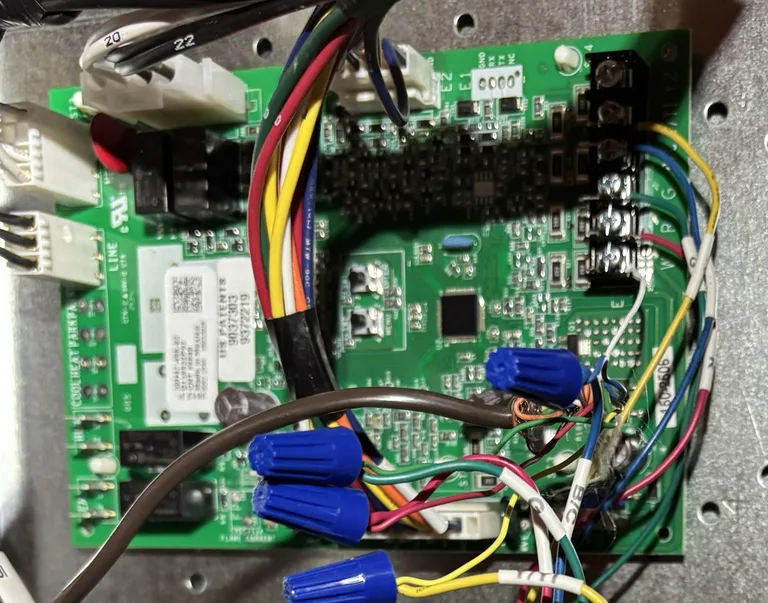
Replace it with the same rating, never a larger one. Then note the outcome, because it tells you what to do next:
- New fuse holds and the screen comes back: something caused a momentary short. Watch it.
- New fuse blows immediately: you have a live short, most often a thermostat wire pinched by a panel screw or chewed in the attic. Stop replacing fuses and get it traced.
This is the single most common blank-screen cause that homeowners never reach, because almost nothing published on this topic names the part or tells you where it lives.
6. Measure R to C
If you own a multimeter and are comfortable working inside the low-voltage compartment, this is the measurement that ends the guessing. Set the meter to AC volts and read between the R (or Rc) terminal and the C terminal at the thermostat sub-base.
Honeywell Home publishes the pass window: "Your thermostat operates between 20-30VAC, any reading outside this range should be addressed by a Professional Contractor." So:
- You read 24 to 28 volts AC and the screen is still dark: power is arriving and the thermostat itself is the failed part.
- You read zero, or something well under 20 volts: the fault is upstream, on the equipment side. Go back through steps 2 through 5.
That single reading splits the problem cleanly in half, and it is the difference between buying a thermostat you did not need and finding a blown fuse.
7. Check the Rc and R jumper if the thermostat is new
If the screen went dark right after an install or a battery swap, check the jumper before anything else. Honeywell Home is specific: "If you have a wire in the R terminal and no wire in the RC terminal, verify the jumper selector switch is up in the '1 Wire' position. If you have a wire in the R terminal and a wire in the Rc terminal, the jumper selector switch must be in the '2 Wire' position." A jumper in the wrong position on a single-transformer system is a dead display, every time.
Also verify the C wire is landed at both ends. Honeywell's instruction is to "Verify the C wire is connected to the C terminal in your furnace or air handler," because a common that is seated at the wall and abandoned at the equipment looks perfect from the living room and delivers nothing.
The Fuse Almost Everyone Checks in the Wrong Place
A correction worth stating plainly, because an earlier version of this guide got it wrong and so does much of the advice online: when a thermostat goes blank, the fuse to check is not the one in the disconnect box outside next to the condenser.
Those outdoor pullout fuses are line voltage, typically 240 volts, and they protect the condenser, not the thermostat. Pulling and probing them will teach you nothing about a dark display, and they are the more dangerous of the two boxes to have open. The fuse that matters for a blank thermostat is the small blade fuse on the indoor control board described in step 5. If your AC condenser is dead but the thermostat still lights up normally, that is when the outdoor disconnect becomes relevant, and that is a different problem.
Blank Screen but the Fan Still Runs
This combination confuses people, and it is one of the more diagnostic symptoms you can have. If the indoor blower runs while the thermostat is dark, then 120-volt power to the equipment is fine and the 24-volt control circuit is the problem.
A dark thermostat cannot be calling for the fan, so something else is closing that circuit. The usual causes, in the order we find them:
- The board's fan relay is stuck closed, often after a surge.
- The G wire is shorted to R somewhere in the run, which energizes the fan continuously and frequently blows the board fuse at the same time. If the fan runs nonstop and the screen is dead, check the fuse.
- A fan switch at the equipment or a ventilation control is holding the blower on independently of the thermostat.
The practical takeaway: a running fan tells you the transformer likely still has line power, so aim your search at the fuse, the C wire and the G wire, not at the breaker.
Trane and American Standard Thermostats
Trane and American Standard publish the same support article for this symptom, one on Trane Home Support and one on AS Air Home, and their controls pair up model for model, so the steps are the same for both. Trane XL824 corresponds to American Standard Gold 824, and XL850 and XL1050 to Platinum 850 and 1050. Both articles end the same way: if the screen is still blank after a power cycle, "contact your HVAC dealer to have them inspect your thermostat and wiring."
Smart controls, XL824, XL850, XL1050, ComfortLink II, Gold 824, Platinum 850 and 1050:
- These have no battery compartment we have ever found in the field. They draw power from the equipment, and Trane's published reset for them is a breaker or on-screen reboot rather than a battery pull. The most common thing homeowners tell us about these controls is that they pulled the faceplate looking for a battery compartment and found nothing, which is exactly right: the generic "replace the batteries" advice sends people hunting for a compartment that was never there.
- Reboot from the screen if it responds at all: press Menu, press Settings, tap Reboot, press Yes. Make sure the system is idle first.
- Reboot from the breaker if the screen is fully dead: switch the HVAC breaker off for 20 to 30 seconds and back on. The reboot takes several minutes to complete, so do not judge the result in the first 60 seconds.
- Trane also documents a physical reseat for an unresponsive screen: "Firmly grip the thermostat and pull it away from the wall, then replace the thermostat on the wall plate." Corrosion or a loose sub-base pin is a real failure mode on these.
Programmable models, XR302, XR303, XR202, XR203: these are the battery models in the lineup. Trane's own reset for them is to remove the thermostat from the wall plate, take the batteries out for two minutes, then reinstall them.
If the screen is still blank after a full breaker reboot and the R to C reading is in range, the control has failed and needs replacement by a dealer.
Honeywell Home Thermostats
Honeywell Home is the brand we see most in this problem by a wide margin, and its thermostats split into two families that fail differently.
Battery models, the RTH and TH series: fresh alkaline cells first. Many of these display a low-battery icon for weeks before going dark, so if you saw an icon and ignored it, that is your answer.
Hardwired and Wi-Fi models, including Lyric, T-series and the round Wi-Fi units: these need the C wire. Honeywell's Lyric guidance is direct: "If you have a wire in the C terminal, you should have AC power and your Lyric's screen should not go blank." Without that AC power the Lyric draws from the heating and cooling system instead and "the Lyric's screen goes to sleep when not being used to conserve energy," so a Lyric that will not wake as you approach usually needs its AAA lithium cell replaced rather than a service call.
For any Honeywell model, the sequence that resolves it is step 2 (door and switch), then step 5 (board fuse), then step 6 (measure R to C against the 20 to 30 volt window Honeywell publishes), then step 7 (the Rc and R jumper). Those four checks cover nearly every blank Honeywell we see.
Carrier and Bryant Thermostats
Carrier and Bryant equipment shares controls, so treat them the same. Carrier's position matches everyone else's: "A blank screen on your digital thermostat almost always points to a loss of electrical power."
Carrier's published order is batteries if the model uses them, then the circuit breaker, then the power switch at the furnace. We add the blower door to that list, because a panel left sitting proud opens the same 24-volt circuit. If yours is an Infinity System Control or another model with no battery compartment, it is powered from the equipment, so skip the battery step and treat a dark screen as a 24-volt problem from the start. Add the control board fuse to Carrier's list, because on Carrier and Bryant furnaces it sits right next to the thermostat terminals and is easy to inspect once the panel is off.
White-Rodgers, Emerson and Older Digital Thermostats
White-Rodgers and Emerson units, including the Sensi line, show up in this problem more than their market share suggests, mostly because so many of them are 15 years old and battery powered.
Three things worth knowing on these:
- Most take AA cells, and the contacts corrode. Clean the battery terminals with a pencil eraser before deciding the unit is dead.
- Older White-Rodgers models can hold a partial display, a few segments lit and the rest dark, which reads as a failing display but is usually low voltage.
- Many pre-2010 units have no C-wire terminal at all, which matters if you are replacing one with a smart thermostat. Budget for either a C wire pull or an adapter.
When the Thermostat Itself Is Dead
You have confirmed the thermostat is the failed part when all of the following are true: 24 to 28 volts AC is present between R and C, the batteries are fresh or the model has none, the fuse is intact, and a full breaker reboot changed nothing.
We plan on roughly a decade of service life from a residential thermostat. Past that, replacement is usually the right call rather than chasing an intermittent display, especially on a unit with no C-wire support, because the next failure is rarely far behind. If you are ready to upgrade, our smart thermostat installation service covers the C-wire question and equipment compatibility, and if your home has hot and cold rooms, look at thermostats and zoning before buying a single replacement unit.
One compatibility warning: a thermostat has to match the system it controls. Heat pumps need a thermostat with O/B changeover, and multi-stage or communicating equipment usually requires the manufacturer's own control. A mismatched thermostat is a common reason a screen goes blank right after a DIY swap.
Replacing a Thermostat in Sacramento: Rebate and Disposal
If you are replacing the thermostat and SMUD is your electric utility, which covers Fair Oaks, Carmichael, Citrus Heights and most of Sacramento County, two SMUD programs apply.
Smart thermostat rebate. SMUD offers a $50 instant rebate on qualifying smart thermostats bought through the SMUD Energy Store. You select "Check rebate eligibility" in the cart and verify your service address or account number, and the rebate comes off the price immediately rather than arriving as a check later. Qualifying models are ENERGY STAR certified, a label that requires independent certification based on actual field data. There is an additional incentive for enrolling the new thermostat in SMUD's My Energy Optimizer program.
Mercury thermostat disposal. If the unit you are removing is an old mechanical thermostat with a mercury tilt switch, the small glass ampule with a silver bead inside, do not put it in household trash. SMUD lists a $30 rebate for safely disposing of mercury thermostats through ThermostatCare. Full program terms are on SMUD's rebates page.
Homes in Placer or El Dorado County, which includes Roseville, Rocklin and El Dorado Hills, are served by PG&E or Roseville Electric instead, so check that utility's program rather than SMUD's. For the larger equipment rebates, see our guide to heat pump rebates in California, which is where the SMUD HVAC rebate tiers live.
When to Call an HVAC Technician
Stop and call someone for any of these:
- The breaker trips again after you reset it once.
- A new control board fuse blows immediately.
- You measure less than 20 volts or more than 30 volts between R and C.
- You smell hot plastic, or see scorched or melted insulation on the thermostat wire.
- The screen is dark and the drain pan keeps refilling.
- The system is a communicating or multi-stage setup and the display is dark after a breaker reboot.
Alpha Mechanical Systems has served Fair Oaks and the greater Sacramento area since 2011. A blank thermostat is one of the faster diagnostics we run: we measure the control voltage, check the fuse and the safety chain, and tell you whether you are buying a thermostat or a repair before any work starts. For a dark screen in cooling weather, see AC repair in Sacramento; in heating weather, see heating repair. You can also reach us at 916.848.5980.
Frequently Asked Questions
Why is my thermostat screen blank?
Because it has lost power. The usual causes, in the order worth checking: dead batteries, an open blower door switch or service switch, a tripped breaker, a condensate float switch that has opened on a full drain pan, a blown low-voltage fuse on the control board, or a missing C-wire connection. The thermostat itself is the least likely cause and the last one to confirm.
Where is the fuse for my thermostat?
On the control board inside the furnace or air handler, next to the thermostat terminal strip. It is a small automotive blade fuse rated 3 or 5 amps. It is not the pullout fuse in the disconnect box outside by the condenser, which is line voltage and protects the condenser instead.
Can a dirty air filter make the thermostat go blank?
Not directly. A clogged filter can freeze the evaporator coil, and the meltwater can fill the drain pan and trip the condensate float switch, which does cut the 24-volt circuit and blank the display. The filter is a root cause a step or two back, not the immediate one.
My thermostat is blank but the fan still runs. What does that mean?
The equipment has line power and the 24-volt control circuit does not. Since a dark thermostat cannot be calling for the fan, suspect a stuck fan relay on the board, a G wire shorted to R, or a fan switch at the equipment holding the blower on. Check the control board fuse at the same time, because a shorted G wire often blows it.
Why is my Trane or American Standard thermostat blank with no batteries in it?
Because those models have no battery compartment. The XL824, XL850, XL1050 and ComfortLink II controls, and the matching American Standard Gold 824 and Platinum 850 and 1050, run entirely on 24 volts from the equipment. Reboot from the breaker for 20 to 30 seconds, allow several minutes for it to come back, and if it stays dark, the problem is on the equipment side or the control has failed.
Why is my Honeywell thermostat blank?
On battery models, dead cells. On hardwired and Wi-Fi models, missing 24-volt power, most often a C wire that is not landed at the equipment or an Rc and R jumper in the wrong position. Honeywell specifies a normal operating range of 20 to 30 volts AC measured between R or Rc and C; a reading outside that range needs a professional.
How much voltage should a thermostat read?
Between 20 and 30 volts AC measured between the R (or Rc) terminal and the C terminal, per Honeywell Home. A healthy system typically reads 24 to 28. Zero means the fault is upstream at the fuse, transformer, safety switch or wiring. A reading in range with a dark screen means the thermostat has failed.
Does SMUD offer a rebate for a smart thermostat in Sacramento?
Yes. SMUD offers a $50 instant rebate on qualifying ENERGY STAR smart thermostats purchased through the SMUD Energy Store, applied in the cart after you verify your service address or account number, plus a separate $30 rebate for disposing of an old mercury thermostat through ThermostatCare. Homes served by PG&E or Roseville Electric should check their own utility's program instead.